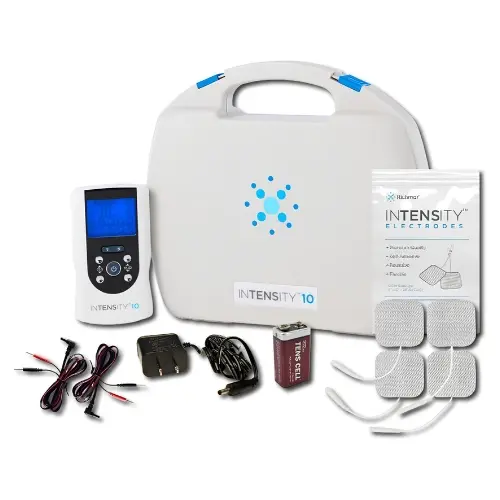
If you have never used a TENS unit before, the wires, electrodes pads, programs, and intensity settings can make a simple device look more complicated than it really is.
The good news is that using a TENS unit is usually straightforward once you understand three things: where to place the electrodes, how strong the stimulation should feel, and how to use the device safely.
TENS—short for Transcutaneous Electrical Nerve Stimulation—uses electrical pulses delivered through electrodes placed on the skin to help temporarily reduce the perception of pain. TENS does not treat the underlying cause of pain, and it does not work equally well for everyone, but it can be a useful non-drug pain-management option for some individuals.
In this beginner’s guide, we’ll walk through your first TENS session from start to finish, including:
- What a TENS unit does
- What you need before getting started
- Where to place TENS electrodes
- How high to set the intensity
- How long to use your TENS unit
- What TENS should feel like
- Important safety precautions
If your pain is new, severe, worsening, unexplained, or related to a significant injury, talk with your healthcare professional before treating it yourself. You should also check with a healthcare professional before using TENS if you have an implanted electronic device, are pregnant, have epilepsy, or have another condition that could make electrical stimulation inappropriate.
What Is a TENS Unit and How Does It Work?
A TENS unit, sometimes called a TENS machine, is a small electrical stimulation device used to help manage pain. The unit sends controlled electrical pulses through wires and electrode pads on the skin.
You can think of TENS as temporarily turning down the volume on pain signals.
Researchers believe TENS can influence the way pain signals are processed by the peripheral nerves, spinal cord, and brain. One commonly described mechanism is called pain gating: stimulating non-painful sensory nerves may help reduce the transmission of pain signals through the nervous system.
TENS may also activate the body’s own pain-inhibiting systems, including pathways involving naturally produced opioid chemicals.
What Does the Research Say?
TENS has been studied for decades, and the evidence has sometimes appeared conflicting because studies have used very different treatment settings, intensities, electrode placements, and pain conditions.
One of the largest analyses to date helps clarify the picture.
A 2022 systematic review and meta-analysis published in BMJ Open evaluated 381 randomized controlled trials involving more than 24,000 adults. The researchers found moderate-certainty evidence that pain intensity was lower during or immediately after strong, non-painful TENS compared with the placebo TENS.
An important detail is that the stimulation was applied at or close to the painful area and at an intensity strong enough to be clearly felt without being painful.
That last point matters: simply turning a TENS unit on at a barely noticeable level may not provide the same effect.
At the same time, TENS should not be viewed as a cure for an injury or medical condition. It is best considered a tool for temporary symptom relief that may be used alongside exercise, physical therapy, medication, or other treatments recommended by your healthcare provider.
What You Need to Get Started
Before starting, have your TENS unit, compatible electrodes, lead wires, a charged battery or fresh batteries, clean and dry skin, and your unit’s instruction manual:
- A TENS unit: Choose a device appropriate for your needs. If you are new to TENS therapy, a unit with preset programs can make setup easier. Shop our full selection of TENS units to compare professional-grade options for home use, clinical recommendations, and recovery routines.
- Electrode pads: Most units come with a starter set of self-adhesive gel electrode pads. Replacement electrodes are sold separately and should be replaced when adhesion starts to weaken.
- Lead wires: These connect the electrode pads to the TENS unit. Always check that lead wires are securely connected and compatible to your unit before starting a session.
- Clean, dry skin: Remove any lotion, oil, or cream from the area before applying pads. This helps maintain good electrode contact and reduces the risk of skin irritation.
- The instruction manual: Every TENS unit is different. Reviewing your device's manual before your first session will help you understand the correct settings and controls.
How to Use a TENS Unit: Step by Step
The steps below apply to most standard wired TENS units. Always refer to the instruction manual for your specific device.
Before You Start
Your first TENS session will usually follow a simple process: place the electrodes at or around the painful area, turn the unit on with the intensity set to zero or its lowest setting, select the appropriate TENS program, and slowly increase the intensity until the stimulation feels strong and clearly noticeable but still comfortable and non-painful.
The steps below walk you through each part of that process in more detail so you can set up your TENS unit correctly and feel more confident before beginning treatment.
Step 1: Prepare Your Skin
Wash or wipe the area so it is clean, dry, and free of lotion, oils, sweat, or creams. Good electrode contact makes stimulation more comfortable and may help the pads last longer. Do not place electrodes over open wounds, irritated or infected skin, or areas where you cannot properly feel the stimulation.
Step 2: Attach the Electrode Pads
With the TENS unit turned off, connect your lead wires to the electrodes and position the pads at or around the painful area, following the placement instructions provided with your specific device.
You generally want the electrical sensation to cover or surround the area where you are experiencing pain.
For example, if you are treating the lower back, you might position two or four electrodes on the muscles surrounding the painful area rather than placing them directly over a prominent bony part of the spine.
A few important rules apply:
- Place electrodes only on healthy, intact skin.
- Leave enough space between electrodes so the pads do not touch one another (about 3”- 5” apart).
- Do not place electrodes on the front or sides of the neck or over the throat.
- Do not position electrodes so electrical current travels across the chest.
- Do not place electrodes on or near the eyes or in the mouth.
- Avoid areas where sensation is significantly reduced unless a healthcare professional has specifically instructed you otherwise.
- Follow any additional electrode-placement warnings in your device's instruction manual.
Electrode placement does not have to be identical for every person. Within a safe treatment area, small changes in pad positioning can sometimes make the stimulation more comfortable or effective.
For body-area-specific examples, visit our TENS Electrode Placement Guide.
Step 3: Connect and Turn the Unit On
Connect everything while the device is off. Plug the electrode leads into the correct channel ports. Make sure the electrodes are firmly attached to the skin. Set the intensity to zero or the lowest setting before turning the device on.
Step 4: Gradually Increase Intensity
Slowly increase the intensity until the sensation feels strong and clearly noticeable, but still comfortable and not painful. As your body gets used to the stimulation, the tingling may begin to feel weaker. If that happens, you can gradually increase the intensity again to maintain a strong but comfortable sensation. If you are using conventional sensory-level TENS, you generally should not need a strong muscle contraction. If the stimulation becomes painful, causes uncomfortable muscle contractions, or produces burning beneath the electrodes, reduce the intensity and check your pad placement.
Step 5: Select a Mode or Program
If your unit includes preset programs or therapy modes, choose the one most appropriate for your needs. Some units offer body-part-specific presets, which can be especially helpful for first-time users. Consult the instruction manual if you are unsure which mode to select.
Don't worry if your unit displays settings such as Hz or µs. These control characteristics such as pulse frequency and pulse duration. For a beginner using a preset TENS program, you generally do not need to manually optimize every number. Research increasingly suggests that achieving a strong, comfortable stimulation may be more important than finding one “perfect” frequency for every type of pain.
Step 6: Set the Timer and Begin Treatment
Follow the session duration recommended by your device manufacturer or healthcare provider. Many TENS programs use treatment periods of roughly 20–30 minutes, but appropriate treatment time varies by device, program, and individual.
TENS should not be used while driving or operating machinery, in the bath or shower, or while sleeping unless your particular device is specifically designed and cleared for that use.
Step 7: End the Session and Remove Pads
When the session ends, turn the intensity back down to zero before powering off the device. Gently peel the electrode pads from the skin, starting at the edges. Place them back on their protective liner and store them in a sealed bag to help preserve the adhesive gel.
Check your skin when removing the pads. Mild temporary redness can occur, but persistent redness, itching, blistering, or burning is a reason to stop using the electrodes and investigate the cause.
Tips for Getting the Most Out of Your TENS Sessions
- Use a strong but comfortable intensity.
- Increase intensity slightly if the sensation fades.
- Position electrodes at or around the painful region.
- Try small placement adjustments within safe areas.
- Make sure the pads have good skin contact.
- Replace dried-out or poorly adhering electrodes.
- Evaluate how you feel during and immediately after treatment, because that is where some of the strongest evidence for TENS benefit exists.
- Record which placements and programs work best for you.
- Don't assume that higher intensity is always better—the goal is strong and comfortable, not painful.
Who Should Check With a Healthcare Professional Before Using TENS?
- Pacemaker, implanted defibrillator, neurostimulator, or other implanted electronic device
- Pregnancy
- Epilepsy/seizure disorder
- Known heart problems
- Unexplained pain
- Significant loss of sensation
- Cancer or suspected malignancy in the proposed treatment area
- Recently injured, infected, swollen, inflamed, or damaged tissue
- Any uncertainty about the cause of the pain
Safety Notice: stop using the device and consult a provider if you experience burning under the pads, worsening pain, dizziness, or any unexpected symptoms.
This content is for general educational purposes only and is not a substitute for medical advice. Always follow your device manual and your healthcare provider's guidance.
What Should TENS Feel Like?
A TENS unit should create a strong but comfortable tingling, buzzing, or pulsing sensation in the area around the electrodes. The stimulation should be clearly noticeable, but it should not feel sharp, painful, or like it is burning your skin. For most conventional TENS programs, you should not experience strong or uncomfortable muscle contractions. Start with the intensity at its lowest setting and slowly increase it until the sensation feels strong but still comfortable. You may notice that the stimulation begins to feel weaker after several minutes as your body becomes accustomed to it. If that happens, you can gradually increase the intensity again to maintain a strong, comfortable sensation. If you experience pain, burning, significant muscle twitching, dizziness, or unusual discomfort, lower the intensity or stop the session and check your electrode placement and device instructions.
Find the Right TENS Unit
Not every TENS unit has the same controls. Some are simple preset devices, while others allow clinicians and experienced users to adjust frequency, pulse width, timer settings, and stimulation modes. TENS Pros carries options ranging from straightforward home-use devices to more configurable electrotherapy systems, along with compatible electrodes, lead wires, and accessories.
FAQs: How to Use a TENS Unit
There is no single treatment time that is right for every person or every TENS unit. Many people start with sessions of around 20 to 30 minutes, while some devices and treatment plans allow for longer use. The appropriate session length depends on your device, treatment program, comfort level, and reason for using TENS.
Electrode pads are placed near the area of discomfort, not directly on it. For lower back pain, pads are typically placed on both sides of the spine at the level of pain, not over the spinal cord itself. See our Electrode Placement Guide for body-area-specific instructions.
Always follow the instructions provided with your specific TENS unit and any recommendations from your healthcare provider. If you are new to TENS, starting with a shorter session can also give you a chance to see how your skin and body respond before using it for longer periods.
How often you can use a TENS unit depends on your device, treatment program, skin tolerance, and individual needs. Some people use TENS more than once per day, while others use it only when pain becomes bothersome.
Rather than following a universal number of sessions, follow the recommendations in your TENS unit's instruction manual and from your healthcare provider. Check your skin between treatments and give it a break if you notice persistent redness, irritation, itching, or discomfort where the electrodes were placed.
For more information, see our guide on how often you can safely use a TENS unit.
TENS should generally feel like a strong but comfortable tingling, buzzing, or pulsing sensation underneath and around the electrodes. You should clearly be able to feel the stimulation, but it should not be painful.
If you have a pacemaker, implanted defibrillator, neurostimulator, or another implanted electronic device, DO NOT use a TENS unit unless the healthcare professional responsible for your implanted device has specifically determined that it is safe for you.
The electrical signals produced by TENS can potentially interfere with the operation of some implanted electronic devices. Because the risk can depend on the type of implant, electrode location, and TENS settings, this is not something you should determine on your own.
Replace your electrode pads when they no longer stick securely to your skin, the adhesive gel becomes dry or damaged, or the stimulation begins to feel uneven or uncomfortable even though the pads are positioned correctly.
Good electrode contact is important because it helps distribute the electrical stimulation comfortably and consistently.
There is no single treatment time that is right for every person or every TENS unit. Many people start with sessions of around 20 to 30 minutes, while some devices and treatment plans allow for longer use. The appropriate session length depends on your device, treatment program, comfort level, and reason for using TENS.
Electrode pads are placed near the area of discomfort, not directly on it. For lower back pain, pads are typically placed on both sides of the spine at the level of pain, not over the spinal cord itself. See our Electrode Placement Guide for body-area-specific instructions.
Always follow the instructions provided with your specific TENS unit and any recommendations from your healthcare provider. If you are new to TENS, starting with a shorter session can also give you a chance to see how your skin and body respond before using it for longer periods.
How often you can use a TENS unit depends on your device, treatment program, skin tolerance, and individual needs. Some people use TENS more than once per day, while others use it only when pain becomes bothersome.
Rather than following a universal number of sessions, follow the recommendations in your TENS unit's instruction manual and from your healthcare provider. Check your skin between treatments and give it a break if you notice persistent redness, irritation, itching, or discomfort where the electrodes were placed.
For more information, see our guide on how often you can safely use a TENS unit.
TENS should generally feel like a strong but comfortable tingling, buzzing, or pulsing sensation underneath and around the electrodes. You should clearly be able to feel the stimulation, but it should not be painful.
If you have a pacemaker, implanted defibrillator, neurostimulator, or another implanted electronic device, DO NOT use a TENS unit unless the healthcare professional responsible for your implanted device has specifically determined that it is safe for you.
The electrical signals produced by TENS can potentially interfere with the operation of some implanted electronic devices. Because the risk can depend on the type of implant, electrode location, and TENS settings, this is not something you should determine on your own.
Replace your electrode pads when they no longer stick securely to your skin, the adhesive gel becomes dry or damaged, or the stimulation begins to feel uneven or uncomfortable even though the pads are positioned correctly.
Good electrode contact is important because it helps distribute the electrical stimulation comfortably and consistently.
Tagged Products